Which TTS Integrates With Google Tag Manager For Audio Ads?
Publishers exploring text-to-speech solutions face a crowded marketplace, but not all TTS services are created equal. The key differentiator? Robust API support and complete GTM documentation that ensures seamless implementation without sacrificing page load speeds or user experience.
In this guide, we'll explore how programmatic audio ads work, examine the most effective ad formats for publisher monetization, and reveal the TTS platform that delivers both superior audio quality and enterprise-grade Google Tag Manager integration. Plus, you'll get a step-by-step implementation guide that removes the guesswork.
TLDR:
Programmatic audio advertising lets you automatically serve ads within audio content. Formats range from companion banners to skippable pre-rolls to rewarded ads.
There are a few different options in the market that allow you to integrate with Google Tag Manager, however, we recommend you check Trinity Audio. It converts your articles into natural-sounding audio, supports 125+ languages, and comes with built-in programmatic ad monetization.
Their Trinity Player embeds on your site and serves contextual audio ads automatically. And they have Trinity Octopus for distributing your audio to Spotify, Apple Podcasts, and other platforms.
Implementation Is Straightforward:
Add the Trinity Audio template in GTM, create a tag with your Player ID, set your triggers, and publish. Quick heads up though: GTM integration can sometimes slow load times, so if engagement tanks, consider their direct JavaScript implementation instead.
Here's The Bottom Line:
If you're a publisher sitting on text content and want a new revenue stream without a complicated tech lift, Trinity Audio is worth a serious look.
What Are Programmatic Audio Ads?
Programmatic audio ads are automated digital advertisements placed within audio platforms like podcasts, music streaming services, and online radio.
They allow advertisers to buy and insert ads more efficiently, with better targeting, measurement, and retargeting. Essentially, they are the natural extension of the online advertising ecosystem into the audio space.
How Does Programmatic Audio Advertising Work And What Are Its Formats?
Programmatic audio advertising uses automated technology to buy and deliver ads within digital audio content. It relies on frameworks like the IAB’s VAST (Video Ad Serving Template), which standardizes communication between ad servers and publishers for audio ad placement, tracking, and cross-platform compatibility.
Here are the main formats of programmatic audio ads:
- Companion ads: Static banners with a brand logo and CTA that appear in the player while the audio ad runs. Users can click these banners while listening.
- Skippable Ad: Audio ads that play before (pre-roll) or during (mid-roll) content to allow listeners to skip after a few seconds.
- Rewarded Ad: 15-60 second in-game audio ads that reward users with bonuses or perks after completing the ad.
- Podcast ads: Commercial audio segments inserted within podcast episodes that are often delivered programmatically or read by hosts.
What’s The Best Text To Speech (TTS) Platform That Integrates With Google Ad Manager For Audio Ads?
There are a few TTS platforms that integrate with Google Tag Manager, but the one we love and recommend is Trinity Audio.
.webp)
Trinity Audio is an AI-driven text-to-speech platform that turns written content like articles and blog posts into high-quality, natural-sounding audio. It’s designed for publishers and creators who want to turn their text-based content into immersive audio experiences while creating new monetization opportunities.
The platform learns listener behavior to deliver personalized recommendations, supports over 125 languages, and offers flexible customization options. Integrations are available for WordPress, Squarespace, Webflow, and many more.
Trinity Player
Trinity Player is a customizable audio player that can be embedded on websites. Its main monetization feature is programmatic audio advertising (automated, contextual ad placement for maximum revenue). Publishers can also use direct ads and sponsorship ads to enable more control over campaigns and partnerships.
Additionally, it offers upgraded versions of the player, such as the display ad audio player, which combines an audio player with a visual banner and call-to-action, and the branded player, which can be customized to match a publisher’s look and feel.
For example, the display ad audio player can automatically turn into a banner after seven to ten seconds of inactivity, then it directs listeners to a landing page, which optimizes site space, and reduces costs.
Trinity Octopus
Trinity Octopus is a hybrid audio editing tool that distributes audio content and helps boost audience reach and engagement. Audio content distributes across streaming services such as Spotify, Apple Podcasts, Google Podcasts, and voice assistants.
How To implement GTM With Trinity Audio
Follow these steps to integrate Trinity Audio player into your website using Google Tag Manager:
Step 1: Add the Trinity Audio template
- Open Google Tag Manager.
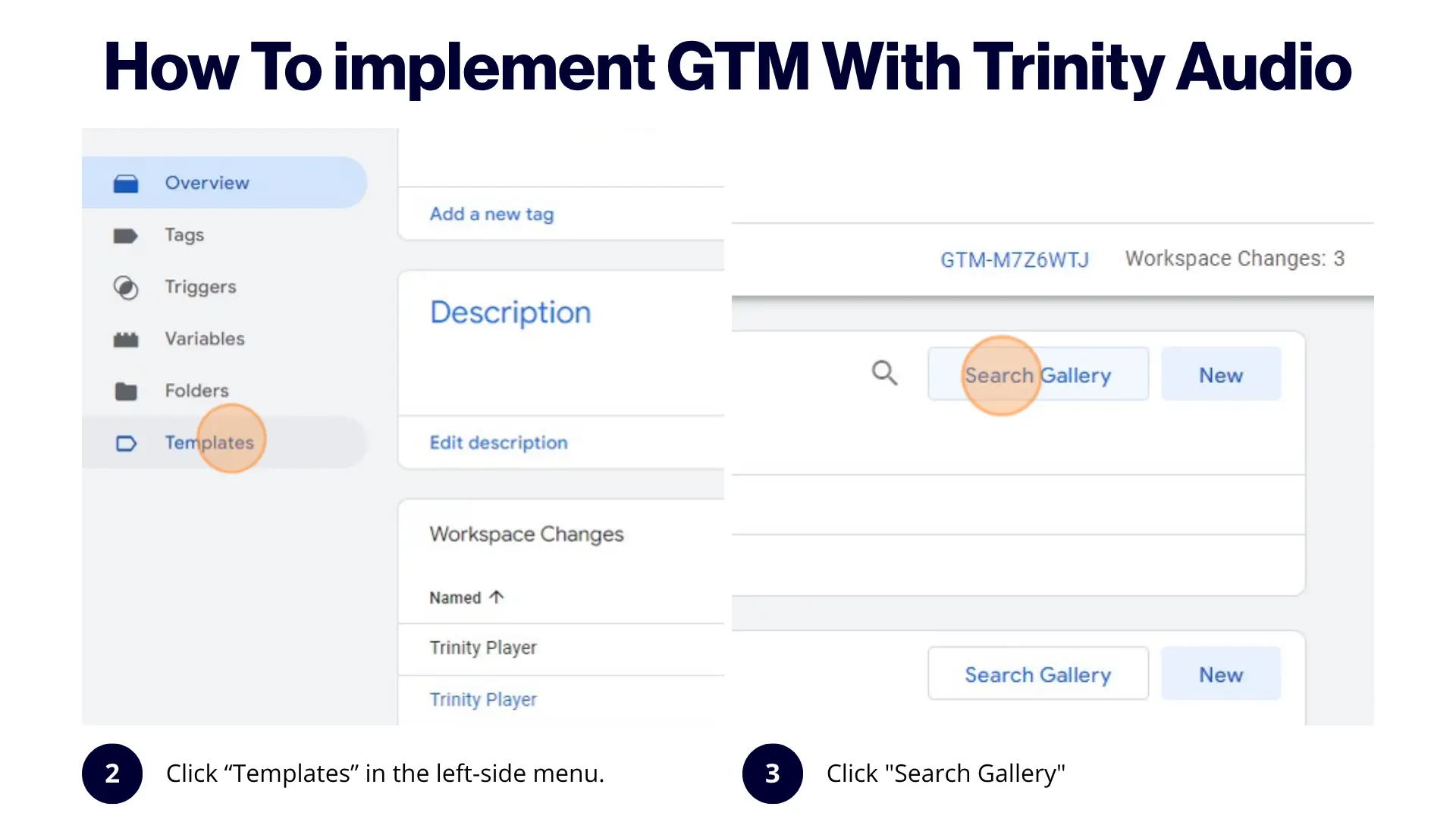
2. Click “Templates” in the left-side menu.
3. Click "Search Gallery"
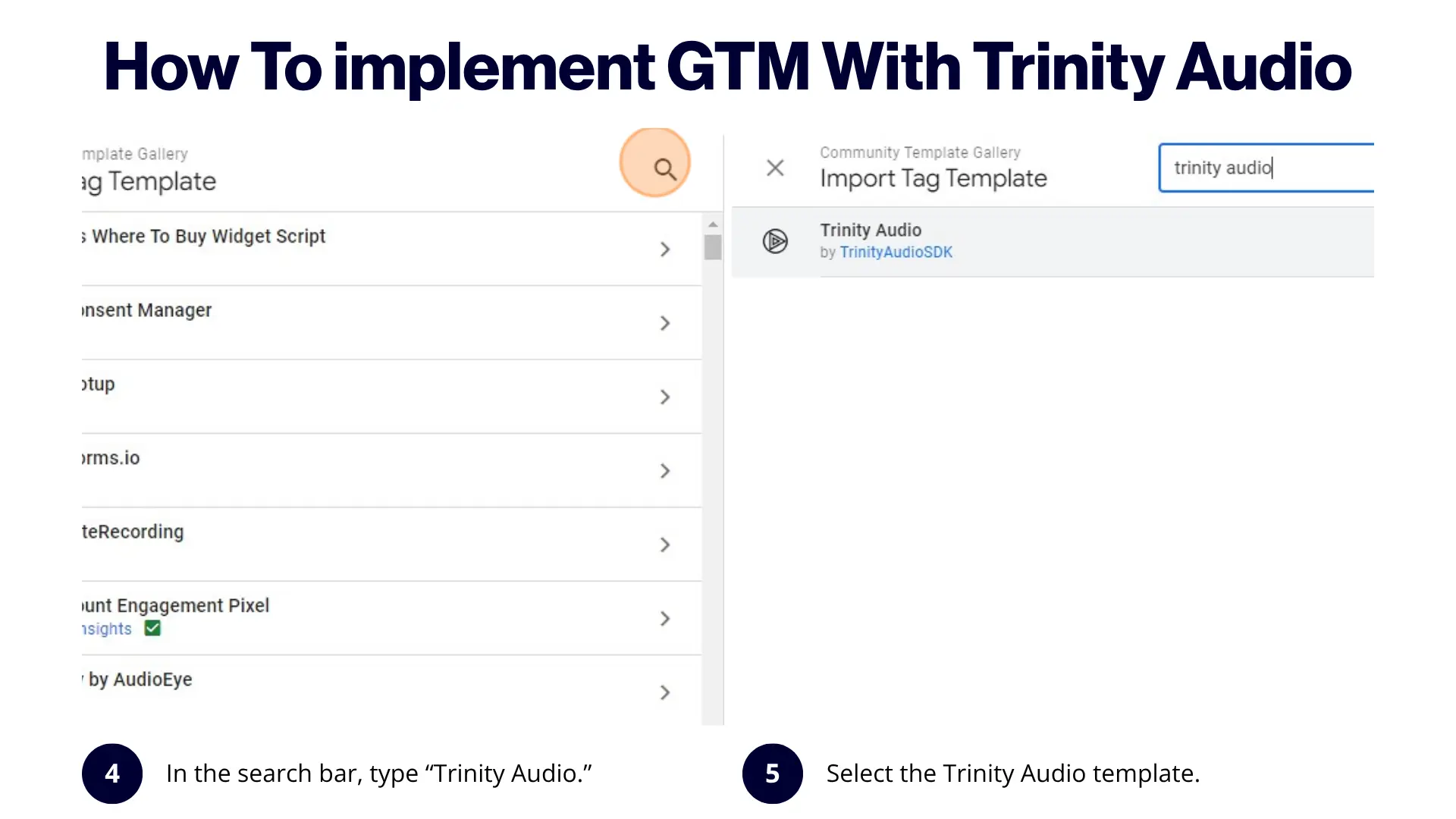
4. In the search bar, type Trinity Audio.
5.Select the Trinity Audio template.
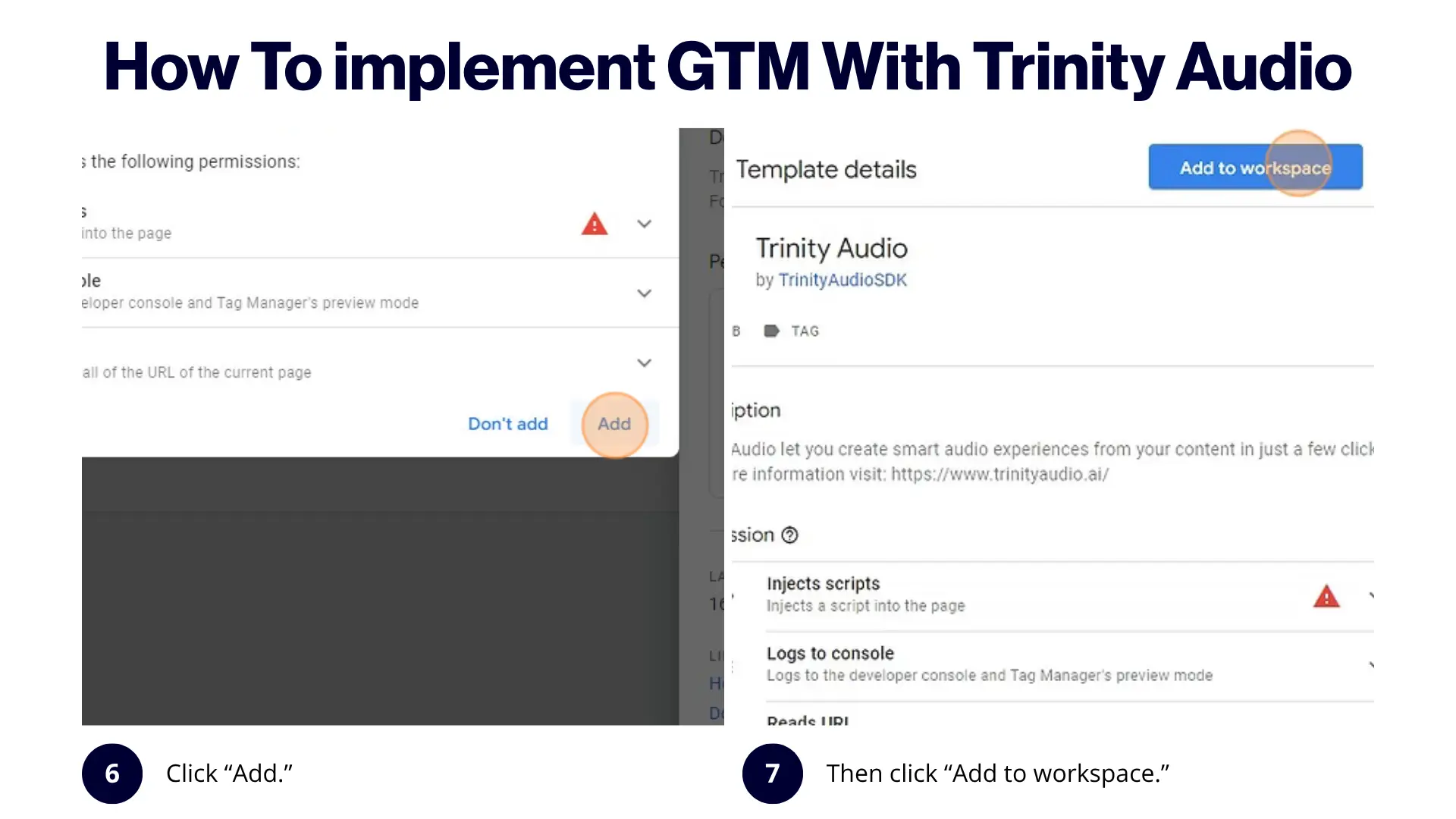
6. Click “Add.”
7. Then click “Add to workspace.”
Step 2: Create a new tag
Once the template has been added, create a new tag:
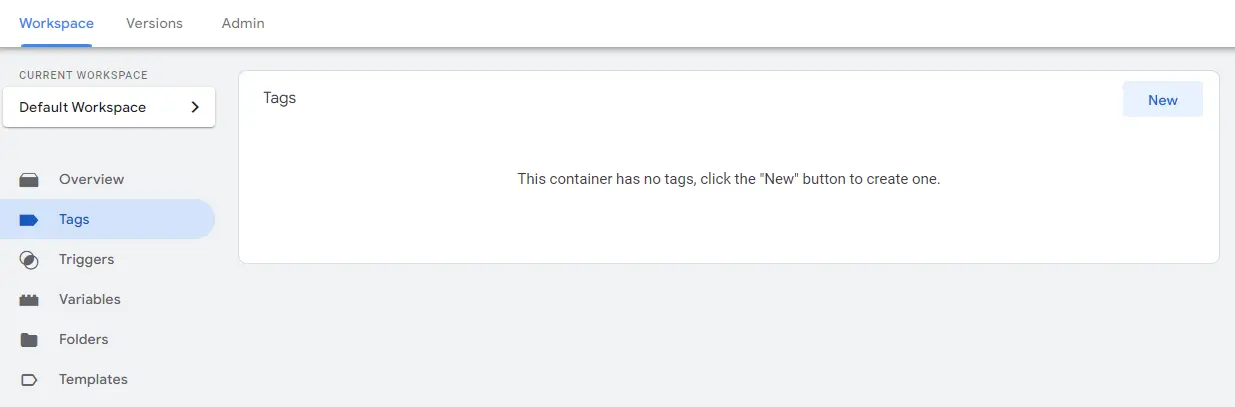
8. In the left-side menu, click “Tags,” then click “New.”
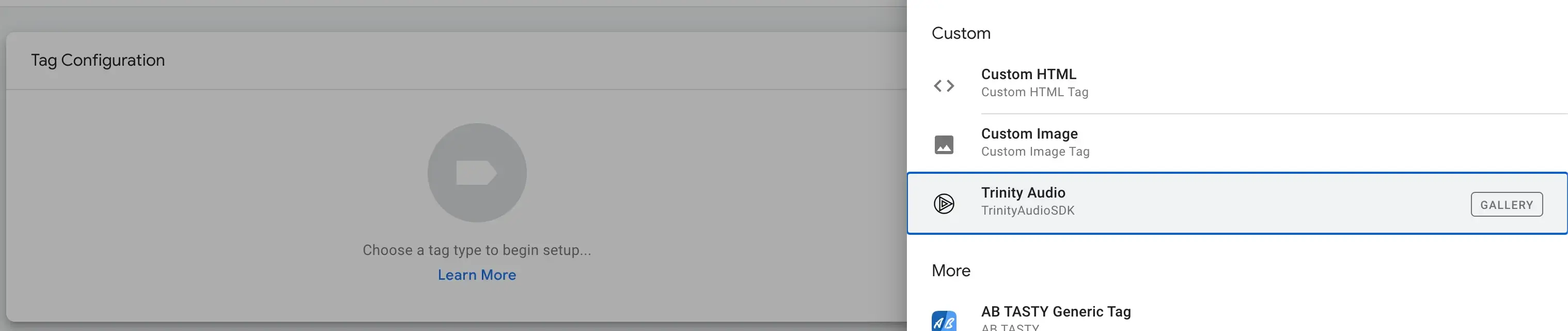
9. Click the Tag Configuration block and select “Trinity Player.”
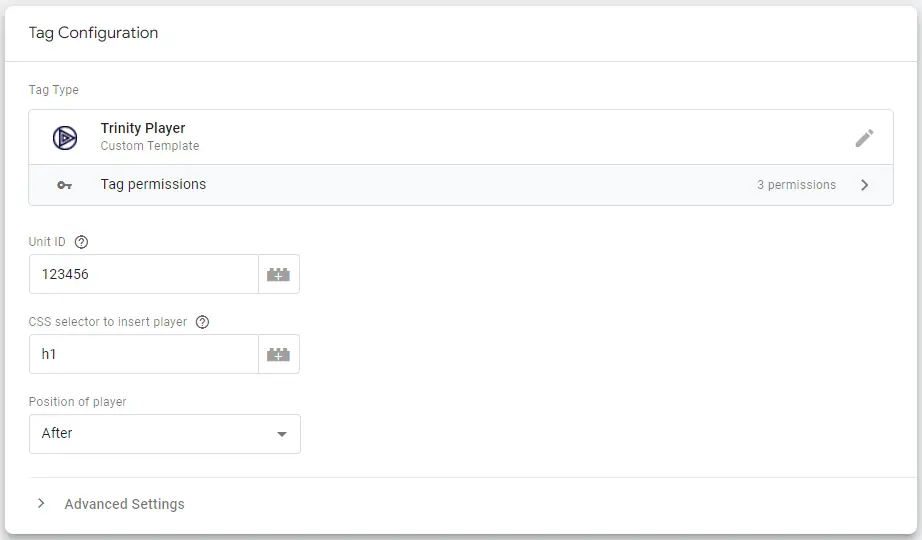
10. Go to your Trinity Audio dashboard, find your Player ID, and insert it into the Unit ID field.
11. Enter a CSS selector to indicate where the player should appear on your website.
a. If you are not sure, leave it as h1 and reach out to Trinity Audio support.
12. Choose whether to display the player above or below the selected element.
a. If you are unsure, leave it as below.
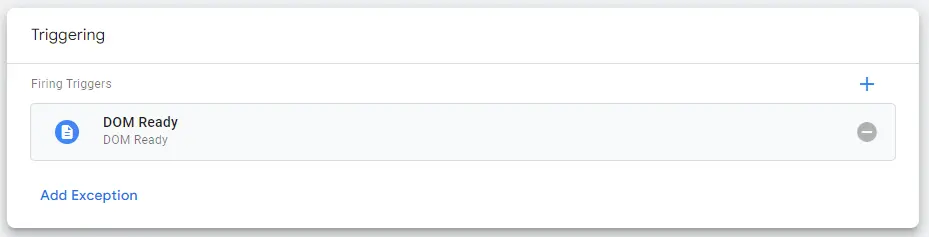
13. Set a trigger to render the tag on all relevant pages, such as article pages, based on the Page View - DOM Ready trigger type.
14. Click “Save,” then Test and Publish your changes.
15. In the Trinity Audio dashboard, locate your player and click “Verify.” The team will run a QA, check to confirm the correct implementation.
a. If verification fails, open one of your article pages, wait a few minutes, and try again.
Note: Using Google Tag Manager might cause delays in the player’s load time and affect engagement metrics. If this happens, we recommend integrating the player using Trinity Audio’s standard JavaScript script instead.
Conclusion
Trinity Audio offers what publishers actually need: seamless Google Tag Manager integration combined with powerful monetization capabilities. While other platforms may offer basic text-to-speech functionality, Trinity delivers a complete ecosystem all designed to transform your existing content into a new revenue stream.

.png)